
Configure Authentication
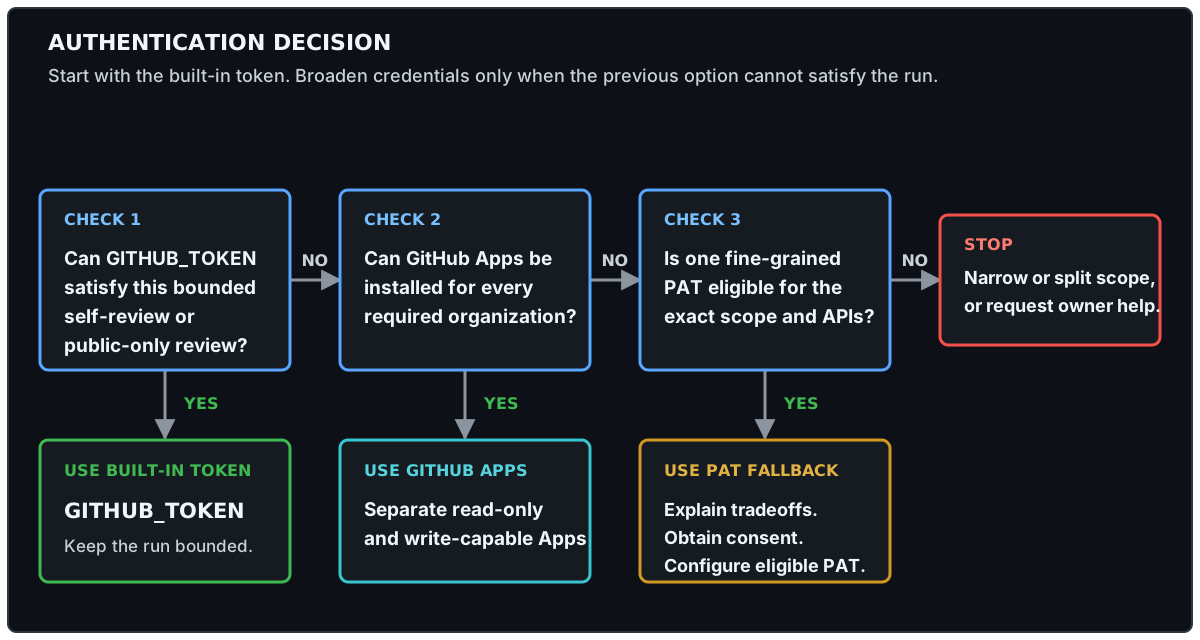
Choose the least-powerful authentication profile that can satisfy the effective target scope, package API requirements, mode, and review destination. Control-repository visibility does not determine target access. Use the built-in workflow token for the bounded cases below, prefer a GitHub App for long-lived cross-repository operation, and treat a fine-grained personal access token (PAT) as a consented fallback with additional eligibility limits.
| Your use case | Credential |
|---|---|
| Self-review against the control repository | Built-in GITHUB_TOKEN |
Public targets in review, with outputs kept in the control repository | Built-in GITHUB_TOKEN, subject to cross-repository API limits |
| Private or internal targets or alternate review repositories | Read-only GitHub App |
| Cross-repository review or live safe outputs | Separate write-capable GitHub App |
| GitHub App installation is unavailable and the exact scope is PAT-compatible | Fine-grained PAT, only after informed consent |
Copilot Engine Authentication
Section titled “Copilot Engine Authentication”Copilot inference authentication is separate from GitHub API and target-repository authentication. CAO requires organization billing: every Copilot-backed workflow declares copilot-requests: write, and gh-aw compiles it to use the built-in ${{ github.token }} for inference. This static workflow contract supports non-interactive gh aw add without install-time source rewriting.
Before installation, require API evidence of an active organization entitlement or explicit confirmation from an organization administrator when the billing endpoint is inaccessible or inconclusive. Stop when organization billing is unavailable. CAO does not support COPILOT_GITHUB_TOKEN inference fallback, runtime token precedence, or mixed authentication profiles. A GitHub App, GH_AW_GITHUB_TOKEN, OAuth token, or target-access PAT serves a different authorization boundary and cannot authenticate Copilot inference for CAO.
Policy
Section titled “Policy”Target-repository authentication is defined once in .github/workflows/shared/control.md and inherited by Orchestrator and worker workflows. The read-only App authenticates GitHub tools, admission, and control precompute. A separate write-capable App serves safe outputs and the advisory API-capacity gate. Safe-output tokens are narrowed to the selected handler’s permissions; gate persistence requests only Actions: write and runs only after a fresh capacity denial. Copilot inference permission remains explicit in every Copilot-backed workflow. Workflow-local GitHub App blocks should not be added unless a future Agentic Workflow has a documented isolation requirement that shared control cannot satisfy.
The supported control-plane credentials are:
| Priority | Credential | Configuration |
|---|---|---|
| 1 | Read-only GitHub App | Repository variable GH_AW_GITHUB_READ_APP_ID and repository secret GH_AW_GITHUB_READ_APP_PRIVATE_KEY |
| 1 | Write-capable GitHub App | Repository variable GH_AW_GITHUB_WRITE_APP_ID and repository secret GH_AW_GITHUB_WRITE_APP_PRIVATE_KEY |
| 2 | Fine-grained PAT | Protected central-agentic-ops environment secret GH_AW_GITHUB_TOKEN |
| 3 | Workflow token | Repository-provided GITHUB_TOKEN for operations it can authorize |
This is runtime availability precedence, not permission to choose a PAT silently. ignore-if-missing: true makes each App optional: when an applicable App token is unavailable, shared control falls through to GH_AW_GITHUB_TOKEN, then GITHUB_TOKEN. The runtime cannot determine why a PAT secret exists or record informed consent. Setup must choose and validate the authentication profile before a run; if App authentication is intended, verify both App ID variables and private key secrets rather than relying on fallback behavior.
The committed root aw.yml intentionally has no config block so normal installation remains compatible with non-interactive gh aw add. Create and install the two Apps manually, then configure both credential pairs:
CONTROL_REPO="acme/central-agentic-ops"
gh variable set GH_AW_GITHUB_READ_APP_ID --repo "$CONTROL_REPO" --body '<read-app-client-id>'gh secret set GH_AW_GITHUB_READ_APP_PRIVATE_KEY \  --repo "$CONTROL_REPO" \  < read-app-private-key.pem
gh variable set GH_AW_GITHUB_WRITE_APP_ID --repo "$CONTROL_REPO" --body '<write-app-client-id>'gh secret set GH_AW_GITHUB_WRITE_APP_PRIVATE_KEY \  --repo "$CONTROL_REPO" \  < write-app-private-key.pem
The private key commands read keys from local files without placing them in shell history.
Automated App setup
Section titled “Automated App setup”The CAO source repository includes a credential-only setup script that mirrors gh-aw’s GitHub App manifest flow without installing or rewriting a package. Run it from a reviewed CAO checkout and target the control repository explicitly:
npm run setup:github-apps -- --repo acme/central-agentic-opsThe script opens two browser flows in sequence. Review and create each private App. When GitHub redirects to the installation page, choose Only select repositories, select only the control repository, and save; do not choose all repositories. The script stores each returned client ID as its repository variable and sends each PEM private key to gh secret set through standard input; it does not write keys to disk or place them in command arguments. Setup is resumable: rerunning it verifies and skips each complete credential and selected-repository installation, or reopens an incomplete installation without recreating the App. Use --dry-run to inspect both manifests without changing GitHub, --no-open to print the local browser URLs, or explicit --read-app-name and --write-app-name values when the generated globally unique names are unavailable.
The Apps are private by default and can be installed only on repositories owned by the App owner. After initial setup, expand each installation only to approved repositories in that organization. Multi-organization enrollment requires an explicitly reviewed cross-organization App publication and installation plan; do not make either App public merely to bypass owner approval. Confirm the read App has no write permission and install the write App only where approved safe outputs may write.
When manual workflow steps need GH_TOKEN, they select the imported App token first when available, then GH_AW_GITHUB_TOKEN, then GITHUB_TOKEN. Missing, incomplete, or invalid credentials must not be copied into dispatch inputs or persisted in artifacts.
API Capacity Admission
Section titled “API Capacity Admission”Before activation, shared control checks the primary REST API capacity of the exact credential selected for control precompute. The check uses GitHub’s GET /rate_limit endpoint, which does not consume primary rate-limit capacity. Admission reserves at least 100 core requests and raises that requirement for broader configured inventory scans.
When capacity is insufficient, the run stops before repository discovery. The admission summary reports remaining and required requests, the UTC reset timestamp, and the approximate minutes and hours until reset. The dashboard exposes the latest failure as a GitHub API capacity admission gate rather than an undifferentiated workflow failure.
Shared control also stores a bounded advisory record in the repository Actions variable CAO_GITHUB_API_GATE. Later runs read the variable without an API request and stop while its reset time remains active. Invalid or expired records are ignored, so the next run performs the live capacity check. Persistence is best-effort through the write App with only Actions: write; failure to write the variable does not change the current denial or grant later work.
Fetch GitHub data efficiently
Section titled “Fetch GitHub data efficiently”Integrations that repeatedly read GitHub data should minimize both request volume and response size:
- Use conditional requests for data that may be unchanged. Persist the last response’s
ETagand send it asIf-None-Matchon the next request; GitHub returns304 Not Modifiedwithout consuming the primary rate-limit quota when the representation is unchanged. - Use GraphQL when a workflow needs related data from many repositories or resources. A single query can select only the fields needed and batch relationships that would otherwise require many REST requests.
- Keep discovery bounded and reuse data already fetched in the current run. Do not poll while waiting for rate-limit replenishment; stop and report incomplete work instead.
For direct HTTP clients, send the conditional-request headers explicitly. The CAO control precompute helper uses gh api --cache 60s for its bounded read requests; this lets the GitHub CLI reuse cached responses and negotiate conditional requests. For GitHub MCP calls, prefer one bounded query over repeated lookups. Conditional requests and GraphQL reduce avoidable traffic but do not replace the admission capacity check or the fail-closed limits described below.
Follow this order:
- Do not rerun before the reported reset time. GitHub directs integrations with zero remaining capacity to wait until
x-ratelimit-reset; repeated requests while limited can result in integration blocking. See rate limits for the REST API and REST API best practices. - For long-lived cross-repository automation, configure the least-privilege GitHub App profile. Follow GitHub’s guide to authenticated App requests in Actions. Shared control requests only
Actions: readandContents: readfor pre-activation and still applies the checked-in CAO scope. - If an App cannot be installed and the exact scope is PAT-compatible, use a fine-grained PAT only after informed consent. Follow GitHub’s fine-grained PAT guidance, restrict it to required repositories and permissions, set an expiration, and store it as the protected
GH_AW_GITHUB_TOKENActions secret.
Fine-Grained PAT Fallback
Section titled “Fine-Grained PAT Fallback”A PAT is not a substitute for repository or organization access. It can only exercise access already held by the user who created it, and it becomes unusable when that user loses the underlying access. Lack of organization-owner permission to install an App does not by itself make a PAT viable.
Before offering a PAT fallback, verify all of these conditions:
- The user can select the target organization as the PAT resource owner and already has the required access to every enrolled repository.
- Organization and enterprise policy permits fine-grained PATs, and any required organization approval can be obtained before the first run.
- All repositories covered by the token have one resource owner. A fine-grained PAT cannot access multiple organizations at once; with CAO’s single
GH_AW_GITHUB_TOKENfallback, a multi-organization scope requires a GitHub App, narrower control planes, or separate credential architecture. - Every API required by the installed package supports fine-grained PATs. Fine-grained PATs do not currently support every endpoint, including the Checks API; do not replace a required App with a classic PAT to work around an endpoint gap.
- The PAT can be limited to the exact enrolled repositories, package-required permissions, and an explicit expiration and rotation owner.
If any condition fails, stop and recommend obtaining a GitHub App installation, narrowing or splitting the scope, or involving an organization owner. Do not present a PAT as an access bypass.
Before selecting, configuring, validating, or using a PAT, explain that it is user-bound, longer-lived than an App installation token, limited to one resource owner, subject to organization policy and endpoint gaps, and dependent on manual rotation and revocation. Obtain explicit confirmation to proceed. Inability to use an App, or the presence of an existing PAT secret, is not consent.
Public Read-Only Profile
Section titled “Public Read-Only Profile”An App or PAT is not required for a bounded review run when every target repository is public and outputs remain in the current control repository. GitHub Actions automatically provides GITHUB_TOKEN; the workflows use it for control-repository workflow discovery, public checkout, and review outputs authorized in the control repository. This is built-in-token operation, not anonymous or credential-free operation.
Keep this profile within these boundaries:
- use
reviewmode and keep safe outputs in the current control repository; - keep target owners allowlisted and all repository and dispatch caps in force;
- treat unavailable cross-repository API data, including Actions logs or security data, as incomplete rather than weakening the requested analysis;
- configure an App or PAT for private or internal targets, an alternate review repository, or any
livecross-repository write.
The workflow token is scoped to the repository containing the workflow. Public checkout does not grant target-repository write access, and a public repository’s visibility does not expand the token’s Actions, security, issue, or pull-request permissions. If a worker cannot read required target evidence with the available token, it must report incomplete and produce no speculative result.
Credential Boundary
Section titled “Credential Boundary”- Each App client ID lives in its control-repository Actions variable, each private key lives in its corresponding Actions secret, and PAT credentials live in the protected
central-agentic-opsenvironment secret. - worker workflows receive repository names and routing policy, never credentials.
- Each Orchestrator and worker workflow run resolves its own token through imported shared control.
- Tokens must not appear in prompts, logs, safe outputs, Repo Memory, review bundles, or correlation metadata.
- For operations outside the public read-only profile, the App installation or PAT repository selection must cover every repository the enabled operations may read or update.
Permissions
Section titled “Permissions”Grant only permissions required by installed operations. The current full catalog separates these App-level ceilings; each minted token is narrower when its job or safe-output handler needs fewer permissions:
| Permission | Read App | Write App | Reason |
|---|---|---|---|
| Actions | Read | Write | Inspect runs and dispatch approved workers |
| Administration | None | Read | Validate repository settings needed by approved maintenance outputs |
| Checks | Read | None | Inspect checks |
| Contents | Read | Write | Read repositories and create approved changes |
| Issues | Read | Write | Inspect issues and emit issue or comment safe outputs |
| Packages | Read | None | Inspect package evidence |
| Pull requests | Read | Write | Inspect pull requests and emit approved pull-request outputs |
| Secret scanning alerts | Read | None | Inspect code-security evidence |
| Security events | Read | None | Inspect code-security evidence |
| Commit statuses | Read | None | Inspect status evidence |
| Vulnerability alerts | Read | None | Prioritize dependency security work |
| Metadata | Read | Read | Required automatically for GitHub Apps |
A package-only installation should narrow these permissions to that package’s workflows. Fine-grained PATs should be limited to the same repositories and permissions.
Example PAT fallback configuration:
gh secret set GH_AW_GITHUB_TOKEN --env central-agentic-ops --repo "acme/central-agentic-ops"The GitHub CLI prompts for the token without echoing it. Do not include the token directly in the command.
Rotation and Revocation
Section titled “Rotation and Revocation”For GitHub Apps:
- Add each replacement private key to its corresponding repository secret.
- Validate review runs for each installed operation.
- Revoke each old private key.
- Recheck both App installations, repository access, and permissions.
For a PAT:
- Create a replacement fine-grained PAT with the same or narrower repository access.
- Replace
GH_AW_GITHUB_TOKEN. - Validate review runs.
- Revoke the previous PAT.
For suspected credential exposure, set affected package kill switches to false, cancel active runs, revoke the credential, inspect GitHub Actions logs and safe outputs, rotate credentials, and resume in review mode.
Validation
Section titled “Validation”Before promotion, verify:
- App-only authentication when an App is configured;
- PAT-only authentication only when the App is intentionally absent, the fallback is eligible, and the operator explicitly consented;
- expected precedence when both are configured;
- target repository coverage;
- organization PAT policy, approval state, resource-owner scope, expiration, and required API compatibility when using a PAT;
- read operations for repository and workflow discovery;
- a review output in the intended control repository without credential material;
- authentication-profile review whenever target scope, package API requirements, mode, or review destination changes.