How the window is put together
The window has fixed places, and extensions put views in them. The main area shows a thread (with its panes beside it) or a space. For the API, see The window and The UI half.
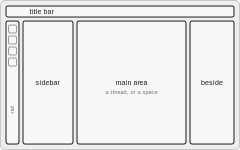
Places
Each view goes where its default says, unless you moved it (right-click it, or edit ~/.superego/layout.json).
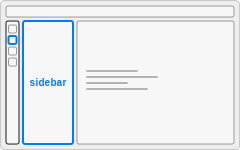
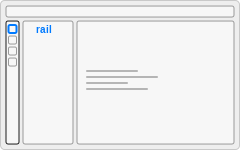
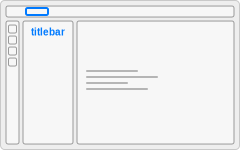
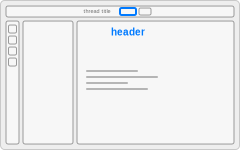
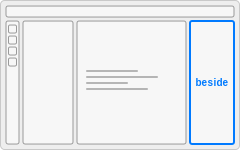
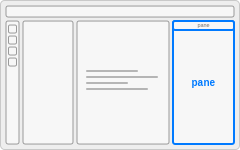
| Place | Is | Example | Whose |
|---|---|---|---|
sidebar |
a rail button, and the sidebar it opens (one open at a time) | Threads, Staff, Notes | the window's |
rail |
a rail button that isn't a sidebar | Ask Ego | the window's |
titlebar |
the title bar's start, standing in when there's no sidebar | the thread picker | the window's |
header |
right of the thread's title | the model chip | the thread's |
beside |
a column right of the thread | thread details (⌘I) |
the thread's |
pane |
the thread's pane menu; the view opens as a pane | Changes | the thread's |
The window's places are the same whatever thread is shown. A thread's places show views about that thread, and a profile's views only in that profile's threads.
Threads and panes
A pane is opened in a thread, with params (a file, a diff, a web page), and kept with it. A thread can have any number. Switch threads and you switch panes.
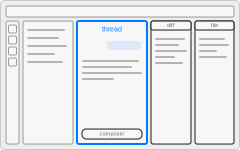
Views, panes and spaces
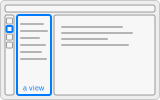
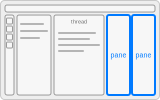
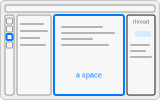
| How many | Where | Opened by | |
|---|---|---|---|
| View | one, by its id | where the layout puts it | being placed |
| Pane | any number, each with params | beside its thread | pane.open, the pane menu, the agent's pane_open, a file link |
| Space | any number, each with params | the main area, instead of the thread | space.open, a link of its scheme (note:…), its sidebar's list |
The thread list is a view. A file is a pane; a note is a space.
Spaces
A space fills the main area: a notes page, a canvas. Back and forward go through spaces as through threads; picking a thread leaves the space.
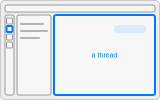
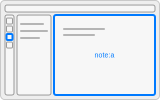
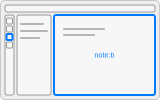
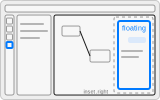
note:a from a link in it, then note:b linked from a. Back returns to a, then to the thread.Each space has its own thread. Until it has one, the column offers Ask about this…: sending starts a thread on the space's profile, told what you have open. It's listed in the sidebar like any other; ↗ opens it as the thread, ✕ undocks it, and the title bar's button shows or hides it.
Sidebars and spaces together
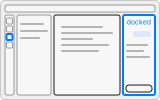
A sidebar is where you pick something; a space is the thing you picked. Notes uses both: its sidebar lists notes, and each note opens as a space with a thread docked beside it.
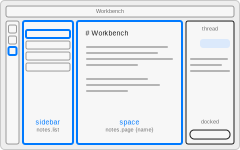
notes.list fills the sidebar; a click opens notes.page with { name }; its thread is docked on the right.Who may put what where
An extension draws with code (a UI half: React components) or data (a daemon half's data view: blocks the window draws, so none of the extension's code runs in the window).
| Who | Window places (sidebar, rail, titlebar) | Thread places (header, beside, pane) | Spaces |
|---|---|---|---|
| The app's bundled extensions | yes | yes, in every thread | yes |
A global profile of yours (global: true) |
yes | yes, in every thread | yes |
| Any other profile of yours | data views only | yes, in its own threads | no |
| A project's profile | no | yes, in its own threads | no |
A global profile is part of the app: the daemon loads it at start, and the window installs its UI as the app's. Notes and Canvas are global profiles. A remote machine's profile UI still asks before its code runs in your window.
On a phone
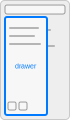
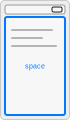
No rail, no title bar. The open sidebar is a drawer over the thread, with the other sidebars at its foot. A thread's title opens its sheet: what the title bar and the column beside would hold. A space fills the screen, and its thread opens as the thread.

Words
| Word | Means |
|---|---|
| Place | a part of the window views go in: sidebar, rail, titlebar, drawer (the window's); header, beside, pane (a thread's) |
| View | something an extension draws, by id, that the layout places |
| Layout | where each view goes: views' defaults, then your changes (layout.json) |
| Sidebar | a rail button and the panel it opens |
| Pane | a column beside a thread, opened in it with params |
| Space | a view that fills the main area, opened with params, with a thread of its own |
| Slot | a spot inside another part (above the message box, after a thread's title in the sidebar) that extensions add to; the layout doesn't move it |
| UI half / daemon half | an extension's code for the window, and for its machine |
| Data view | a view drawn from blocks a daemon half sends, with no code in the window |
| Global profile | one of your profiles that's part of the app, not only of its threads |