

Data ingestion
Data ingestion moves operational evidence from GitHub Actions into the browser
dashboard and local tools. Read this page to understand collection boundaries,
retention, failure behavior, and the available cao commands. For entity
identities and relationships, use the Data model.
For where the dashboard is served, see Deployment options.
Data flow
Section titled “Data flow”Agentic workflows produce Actions logs. The Activity workflow collects a bounded snapshot into published JSONL. Consumers apply the shared model rules to build two separate projections: SQLite supports agents and command-line tools, while IndexedDB supports the browser dashboard.
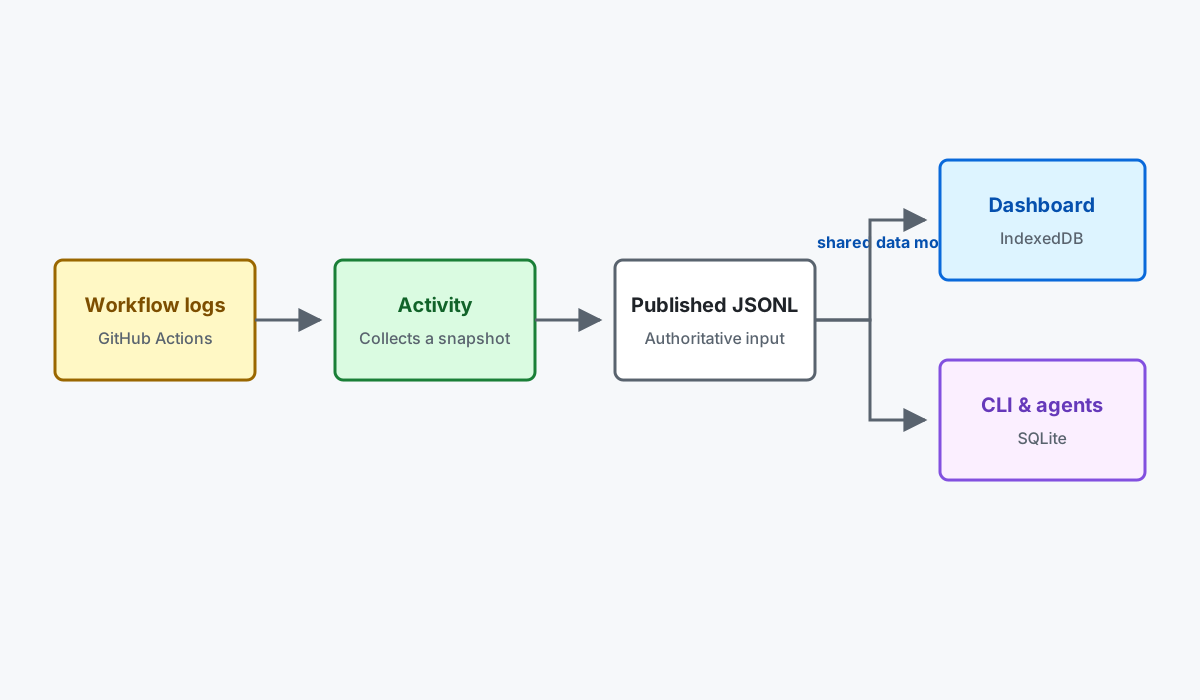
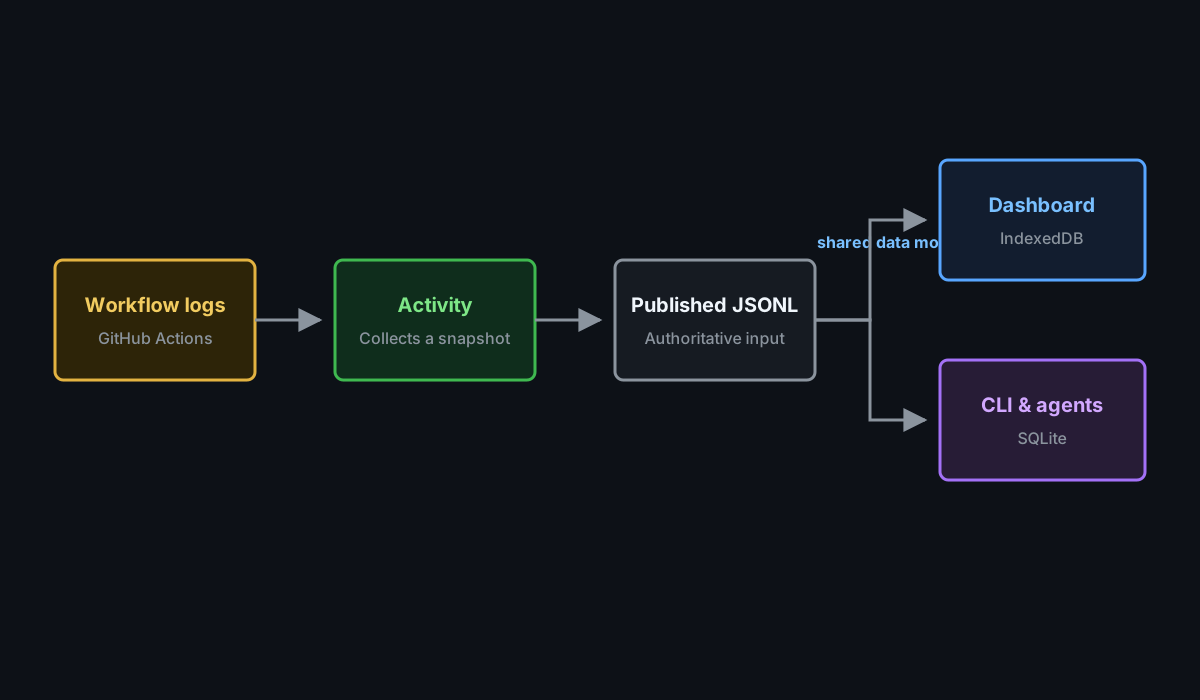
SQLite and IndexedDB are rebuildable projections. Neither is the source for the other. The local SQLite adapter implements the same logical object stores, indexes, records, conversion rules, and queries as browser IndexedDB. It is not a separate relational canonical schema. Both keep all run summaries available in the published JSONL. SQLite keeps Run and Operational Value records for 30 days by default and expires run-linked detail after seven days unless a separate full-detail SQLite archive is requested.
See Data model for the canonical entities, identities, and relationships produced by ingestion.
Before the first Activity snapshot
Section titled “Before the first Activity snapshot”The CAO Dashboard workflow restores the Activity cache or downloads the snapshot from the latest successful CAO Activity collection run on the default branch, ignoring runs that skipped snapshot indexing. On a new deployment, neither may exist yet. In that case, the workflow builds and publishes the dashboard using installed campaigns, workflows, and configuration from its trusted checkout, together with an empty activity set. Pages publication still follows the configured deployment policy.
This bootstrap does not discover remote repositories, collect logs, or run activity computations. It marks inventory coverage as partial, leaves live workflow state unknown, and omits uncollected marketplace sources rather than inventing evidence. The normal pipeline creates valid empty activity shards and a SQLite projection; it does not publish the bootstrap as an Activity cache.
Configure Activity authentication, then run CAO Activity manually to collect the first snapshot, or wait for its scheduled run. A successful default-branch Activity run automatically triggers the dashboard build with collected evidence. API errors, invalid policy, missing artifacts from an existing successful run, and invalid restored snapshots still fail rather than being treated as normal startup.
Local administrative actions
Section titled “Local administrative actions”The shared CLI executor is packaged in dashboard/cli-actions.mjs so installed
campaigns can run local administrative actions without the Copilot extension.
The extension re-exports the same executor rather than maintaining a separate copy.
Local previews refresh the latest stable gh-aw release from GitHub when downloading their data. The Latest compiler version and upgrade state use this current release, not the release recorded in an older published snapshot. Installed versions and their observation times remain snapshot evidence. If release discovery fails, startup reports an error rather than presenting the snapshot’s stale release as current.
Run npm run dashboard:local -- --admin --repo OWNER/REPOSITORY to opt in to
dashboard-declared CLI actions on the local preview server. Without --admin,
the local preview remains copy-only. Admin mode is limited to a loopback host;
it cannot be combined with canvas mode or the hosted Go server.
Each action opens a command-review dialog and requires explicit confirmation
for every run. Once the server durably queues the approved command, the dashboard
opens its full-page console with a Back to Commands navigation button.
The console shows live stdout and stderr in a scrollable, read-only terminal
with the executed command on its first line, ANSI colors, progress updates,
selection, and scrollback. HTTP and HTTPS
URLs in terminal output open in a separate tab without opener access.
Stderr and command failure messages use the terminal’s error color.
The last HTTPS pull-request URL in retained command output becomes the durable
command result. GitHub Enterprise hosts, custom ports, and path prefixes are
supported; embedded credentials are rejected and query strings and fragments
are excluded. Open pull request opens that result in a separate tab.
Copy copies the pull-request URL when available, otherwise the command
transcript. Copying never cancels or reruns the command.
The console stays visible after completion, failure, timeout, or cancellation
until the user navigates away. Back navigation and output disconnection only
detach the browser; they do not cancel execution. Reopening a command from
Commands replays its retained output without starting another command.
Terminal input is disabled: commands must not require interactive keyboard input. The terminal
emulator is an interaction-only extension of the existing declarative
cli-actions contract, not a dashboard data query or an arbitrary shell.
Commands run in the server’s working directory with the local GitHub CLI
credentials and the existing supported-command allowlist, without shell
interpolation. Actions using gh aw may install the pinned extension first.
The server admits queued commands within its concurrency and quota limits.
Cancel dismisses the approval dialog without starting anything. The console
offers Copy instead of a cancellation button and Retry command for failed
or timed-out work. Starting another action requires fresh confirmation in the
web interface, not an additional confirmation in the Copilot app.
Keep the capability URL private and
do not expose or forward the admin server to other users. This switch does not
change CAO rollout policy or grant remote workflow authority.
Hosted server data pipeline
Section titled “Hosted server data pipeline”Server-backed deployments keep the browser isolated from both databases. The Go server verifies the same published payload, normalizes inventory metadata onto canonical records, and transactionally replaces the current dashboard sources in PostgreSQL. Dashboard Language queries execute against PostgreSQL, using parameterized SQL for proven plans and the bounded Go evaluator for other supported shapes.
Redis is not a dashboard database. It stores operational state such as sessions, rate limits, webhook and collection queues, delivery deduplication, distributed coordination, GitHub quota observations, pending token revocations, and bounded resolver caches. It does not store dashboard entity rows, query indexes, or persistent dashboard projections. If PostgreSQL is unavailable, dashboard data is unavailable even when Redis is healthy.
Completeness and duplicates
Section titled “Completeness and duplicates”The scheduled Activity workflow is a rolling operational snapshot, not a full historical archive. Data can be incomplete at these boundaries:
| Boundary | What can be missing |
|---|---|
| Collection | Runs outside the configured 30-day window. |
| Enrichment | The scheduled command downloads at most five matching usage artifacts across all workflow targets per Activity invocation. |
| GitHub retention | Expired or unavailable artifacts cannot provide agent, usage, job, or audit detail. The run summary may still exist. |
| Mapping | GitHub API rate-limit records without collection context are intentionally not attached to a run. |
| Browser storage | IndexedDB keeps all published run summaries and expires run-linked detail after seven days. |
Cached JSONL can repeat the same run in later snapshots. These are repeated observations, not duplicate database records. Raw runs are deduplicated by GitHub run ID and attempt. Enriched runs are deduplicated by run ID and attempt, with the newest observation winning.
Audit a JSONL source without changing a database:
cao audit-jsonlThe report separates raw observations, unique raw runs, enriched observations, unique enriched runs, repeated observations, unenriched runs, and the canonical record counts that ingestion will produce.
Create a historical archive
Section titled “Create a historical archive”For a full-detail local archive, collect into _activity/gh-aw-history.jsonl, then audit and ingest it with unbounded retention:
cao audit-jsonl \  --input _activity/gh-aw-history.jsonl
cao ingest-jsonl \  --database _activity/gh-aw-history.sqlite \  --input _activity/gh-aw-history.jsonl \  --retention-days all
cao doctor \  --database _activity/gh-aw-history.sqlite \  --ttl-days all
“Full” means all run summaries discoverable in the selected range plus every artifact still available from GitHub. Expired artifacts remain visible as unenriched runs rather than being silently counted as complete.
Browser data pipeline
Section titled “Browser data pipeline”The unified-session adapter retains only metadata needed for model-routing analytics: safe identifiers, explicit classifier labels, request ownership, per-response token/AIC observations and source receipts. It accepts headerless legacy sessions and records their format coverage. Unsupported session versions retain the header only. Source-receipt phases take precedence over the collection event’s conclusion-phase provenance. Prompts, bodies, free-form reasons/errors and content-derived hashes are not projected into routing facts.
Runner-written model.resolution events become one Audit record per recorded
role with the event engine, role, configured model, resolved model, provider,
status (resolved, exact or failed) and cause (model_unavailable or
catalog_unavailable). Configured and resolved models keep their recorded value,
including provider prefixes; unsafe or missing values stay unknown, and a failed
resolution keeps its resolved model unknown. The events have no timestamp, so
failed resolutions appear in the Model routing Problems view once per run, with
an unknown time unless the session clock is recorded, and per-run resolution roles
stay on the run page. Routed sessions are expected
to lack these events, and legacy sessions report no resolution evidence rather
than failure. Canonical schema 32 / IndexedDB version 42 rebuild older browser
projections; hosted PostgreSQL needs a fresh generated schema with the new
Audit columns.
The activity shard manifest is the dashboard’s published operational input. The worker downloads and processes each listed schema-v2 JSONL shard independently through a versioned ingestion expression. Raw workflow_runs payload rows create Repository, Workflow, and Run observations. Enriched run envelopes update the same Run identities and create deterministic Domain, Tool, Audit, and Issue records owned directly by those Runs. github_api_rate_limit envelopes create Audits only when explicit collection context identifies their owning run; browser ingestion does not fabricate that ownership. Unknown kinds and unsupported non-empty schema versions fail explicitly.
The complete normative cached gh-aw JSONL mapping describes source fields, canonical entities, identity, ownership, and accounting.
The canonical model is version 32. The browser database is
gh-aw-cao-dashboard-data, IndexedDB version 42. Its canonical stores are
campaigns, repositories, workflows, runs, domains, tools, skills,
friction, audits, issues, operationalValues, marketplacePackages,
experiments, experimentAssignments, graders, graderObservations,
evals, and evalObservations;
all use id as the key.
The transactions store records
ingestion outcomes and is indexed by createdAt. The disposable
Overview aggregates are computed by request-scoped queries over canonical runs
rather than stored separately. Because the database is derived state, physical schema
upgrades rebuild every store from authoritative dashboard inputs.
Experiment assignments and eval observations come from the unified session when it contains them. Otherwise, ingestion accepts gh-aw’s explicit current-run assignments.json artifact (including the compact usage/experiment/ layout and prefixed artifact directories) and a supplied evals.jsonl. Collection requests the usage,experiment,graders artifact sets without widening repository scope or collection budgets. Before retaining these artifacts, collection verifies repository, run ID, and attempt against aw_info.json; a mismatch skips that evidence. Unified assignments, including an explicitly empty map, take precedence, and cumulative experiment state counts never infer a run’s variant. The Experiments page shows retained assignment variants with run evidence links, and the Evals ledger shows YES, NO, and UNKNOWN answers distinctly; UNKNOWN is not a failed eval.
gh-aw v0.92.6 publishes built-in graders in the unified session and usage/graders/, with custom grader results in a separate graders artifact. Ingestion accepts version-1 and version-2 result documents, uses the adjacent grader_manifest.json for definition metadata, and retains session results in preference to duplicate built-ins. The separate artifact may add custom results not already present in the session. Native metric order, finite values, explicit null values, and evaluator digests survive projection; scripts, messages, error bodies, and raw session payloads do not. Historical repository-owned shell evaluators remain retired and are not executed during collection.
Normalized shards are written in bounded transactions, with a separate receipt recorded after each complete shard. A stopped import can reuse those receipts on the next visit, even before the full snapshot marker has been written. Run-phase views can load after the run shards finish while record shards continue. Retention and orphan cleanup run after shard ingestion. During maintenance, the worker expires run-linked detail outside the seven-day window and Operational Values outside the 30-day window, pruning orphaned descendants and unreferenced structural parents. The effective retention horizon is the later of the browser clock and the newest incoming observation, so a slow clock cannot prune current producer data.
Every merged batch must satisfy these relationships:
- Workflow to Repository
- Run to Repository and Workflow
- Domain, Tool, Audit, and Issue to Run
Work items and findings are projected from Issue and Audit records rather than stored in separate canonical tables. Independent logical sources, such as usage, outcomes, admissions, security, and MCP evidence, retain their published schemas in worker memory and are selected only when a page requests them.
Source download, adaptation, normalization, IndexedDB writes, and page queries run in a dedicated Web Worker. Successful inputs write content-addressed receipts containing the ingestion version, payload identity, and retained or committed record counts. A failure writes a diagnostic receipt when possible. Bounded writes that committed before a later failure may remain in the disposable database, but no successful receipt is written and the shard remains retryable.
Actions publishes normalized run and record shards with a 1 MiB budget, including metadata and UTF-8 bytes. A single larger record is kept intact in its own shard rather than truncated. Records are deduplicated before being ordered by collection and canonical ID within stable day buckets, so changes in source arrival order alone do not force clients to download and ingest unchanged data. The 4 MiB raw-source compaction budget is independent of this published budget.
Worker errors abort the update instead of rerunning ingestion through an older path. There is no shadow, dual-read, alias, or fallback route. Views render only after the worker returns that page’s query projection.
Before ingestion, the browser inspects its storage estimate and requests persistent storage when the API is available. Either request may be denied or fail without affecting correctness. Diagnostics use stable categories such as NORMALIZATION_FAILED, TRANSACTION_ABORTED, and QUOTA_EXCEEDED.
IndexedDB is disposable derived state. Clearing browser storage reconstructs it from authorized published inputs; it does not delete authoritative information.
To investigate repeated imports on a mobile browser, open the dashboard with
?debug=data:ingestion,data:indexeddb,quota. The worker reports whether the
complete snapshot was found, schema upgrades, storage quota and persistence
availability, cached versus missing run and record shards, shard commits, and
dashboard revisions. These diagnostics report counts and storage metadata, not
record contents. A missing-snapshot message alone does not mean previously
committed shards were lost: compare the shard-cache-checked counts on the next
visit. Browsers may decline persistent storage or evict this rebuildable cache.
Validate browser performance
Section titled “Validate browser performance”Run npm --prefix dashboard/site run test:performance to audit the production
build in two states: an empty canonical database and a completely ingested
published Activity snapshot. The runner downloads every normalized JSONL shard,
verifies its manifest hash, waits for successful ingestion, and records canonical
store counts before and after the audits. Its empty snapshot uses valid
zero-record shards and empty inventory, not fixture-mode presenter data.
The CFO, CTO, and CSO journeys check that visible views finish loading without unavailable-data cards, including the inventory table modes. Lighthouse measures desktop and mobile separately and reports three-run medians. Cold-network audits clear HTTP cache and bypass the audit page’s service worker while retaining IndexedDB; separate PWA audits use normal service-worker responses. PWA transfer sizes do not represent uncached network bytes.
Production builds compile the shared styles into a native linked stylesheet, preload the entry and application modules, and keep route modules deferred. The worker is bundled independently so its startup does not repeat discovery of the application’s shared chunks. Source-mode previews retain the same shared styles and rendering contracts. Production keeps source-declared glyphs in a small inline icon core and loads the complete sprite only for other supported campaign icons. The complete sprite is precached for offline use; unknown names retain the question glyph.
To compare revisions against the same downloaded evidence, set
DASHBOARD_PERFORMANCE_DATA_ROOT to a directory containing
payload-hashes.json, inventory-sources.json, memory/, and all declared
normalized shards. DASHBOARD_DATA_URL selects a different published manifest
when downloading. DASHBOARD_PERFORMANCE_REPEATS changes the repetition count,
and DASHBOARD_PERFORMANCE_NETWORK_MODES=cold runs only the cold cohort.
Reports, browser traces, desktop/mobile screenshots, ingestion timings, and
persona-journey timings are written under
dashboard/site/test-results/lighthouse/. A missing shard, failed query, invalid
state, or breached performance budget fails the command and the CI job.
Complete eager-ingestion time is recorded separately from page readiness: normal
first visits can still explore partial data while import continues.
SQL interchange
Section titled “SQL interchange”SQL uses the versioned gh-aw-cao.dashboard-sql-export interchange contract. Database owners map their schema to the contract and export static JSON before deployment. Local and deployed environments use the same contract, validator, adapter, and canonical queries; the static dashboard never opens a database connection.
Use local SQLite
Section titled “Use local SQLite”Node.js 24 can run the same ingestion and query layer against a persistent
SQLite file. The local adapter stores IndexedDB metadata and JSON records in
__idb_databases, __idb_stores, __idb_indexes, and __idb_records; those
tables are an emulation detail, not canonical entity tables. The browser
continues to use native IndexedDB.
Ingest an extracted gh-aw log directory with its run context:
cao ingest \ --database /tmp/cao-dashboard.sqlite \ --context dashboard/site/test/fixtures/gh-aw-logs/context.json \ --logs dashboard/site/test/fixtures/gh-aw-logs/run-303Alternatively, ingest schema-v2 JSONL produced by gh aw logs:
cao ingest-jsonl \ --database /tmp/cao-dashboard.sqlite \ --input-dir .cao/gh-aw-logs-shardsPass --context CONTEXT_JSON when JSONL github_api_rate_limit records should become canonical Audits. Without an owning collection Repository, Workflow, and Run, those records remain unmapped.
Download the JSONL and SQLite projection published by the deployed CAO Pages site:
cao downloadThis writes .cao/payload-hashes.json, the published compacted
.cao/gh-aw-logs-runs/ and .cao/gh-aw-logs-records/ shards, and
.cao/gh-aw-logs.sqlite by default. Set DASHBOARD_DATA_URL, pass --url URL,
or pass --output DIRECTORY to change the source or destination. The command
downloads the published files unchanged; it does not run ingestion locally.
Query a canonical collection:
cao query \ --collection runs \ --where conclusion=failure \ --limit 20Use the gh-like query surface for familiar GitHub CLI-shaped commands:
cao gh runs --repo OWNER/REPOSITORY --workflow WORKFLOW --status failure --since 2026-09-01 --until 2026-09-15cao gh issues --repo OWNER/REPOSITORY --workflow WORKFLOW --since 2026-09-01 --until 2026-09-15cao gh prs --repo OWNER/REPOSITORY --workflow WORKFLOW --since 2026-09-01 --until 2026-09-15-R, -w, -s, and -L alias --repo, --workflow, --status, and --limit. The default limit is 30. Date-only --until values include the entire date. Issue and pull request results come from canonical Issue records created by safe_output.result observations.
Diagnose and repair the local database:
cao doctor \ --database /tmp/cao-dashboard.sqliteThe doctor reports SQLite integrity, foreign-key and schema health, table and transaction counts, malformed records, and relationship errors. It applies the default seven-day run-linked detail and 30-day Run and Operational Value windows (or explicit --ttl-days and --run-ttl-days overrides), removes malformed and orphaned derived records, repairs metadata, and runs SQLite maintenance. Before changing data, it creates a timestamped .doctor-backup-*.sqlite backup next to the database.
To let an agent read the same snapshot through dashboard pages and named queries, instead of through collections, see Agent analysis.
Run cao help for the collection list and full command syntax. The SQLite file remains local derived state and does not change the static dashboard’s deployment boundary.
Choose a local preview data backend
Section titled “Choose a local preview data backend”npm run dashboard:local selects the dashboard’s query backend with --data-backend:
| Backend | Behavior |
|---|---|
sqlite | Default for local previews. Ingests the downloaded inventory and Activity shards into a temporary server-side SQLite projection; the page uses the remote HTTP query backend instead of browser IndexedDB. |
indexeddb | Opt-in browser backend. The page uses the static browser backend. |
postgres | Selects the Go/PostgreSQL server. It needs the reviewed host policy, built site, database, and OAuth/HTTPS configuration, and does not support canvas previews. |
npm run dashboard:local -- --data-backend sqlite --repo OWNER/REPOSITORYSQLite initialization failures stop startup; the preview does not silently fall back to IndexedDB. The canvas open input accepts dataBackend: "sqlite" or "indexeddb".
For normative requirements and failure behavior, see the Dashboard Data Architecture Specification.