

Overview component model
This page explains how the Overview view is composed. Start with the operator guide if you want to interpret the metrics; use this page when you are building, reviewing, or testing the interface.
Built from focused components
Section titled “Built from focused components”Overview uses focused components so each part can be understood, maintained, and tested independently. Components own presentation and interaction, while Dashboard Language owns filtering, joins, and operational calculations. This keeps the interface consistent without hiding business logic in page code.
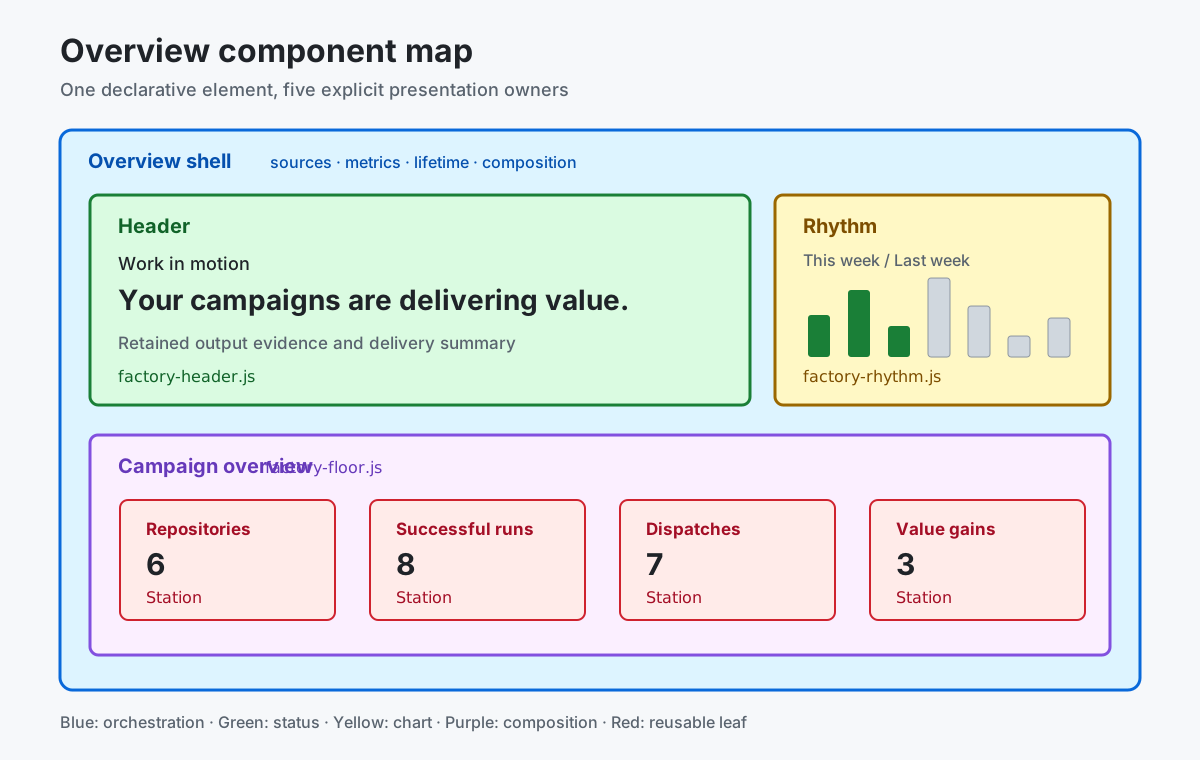
Declarative composition
Section titled “Declarative composition”Dashboard Language exposes the factory overview as two reusable named elements declared
as separate views in dashboard.json:
headerowns status, retained-output context, work-in-motion state, and Weekly rhythm, plus the opt-in Data ingestion indicator.floorowns the four linked metric stations and their aggregate accessible summary.
The default dashboard declares factory-header followed by factory-floor.
Each view selects only presentation-ready query outputs, and their declared order
reconstructs the complete factory overview without page-specific composition code
or main-thread business derivation.
Each declared source binds independently to the reactive tree, so the page and
both element roots appear immediately. Pending state is shown only by the status,
rhythm, or metric station waiting on that query rather than by a page-sized view
skeleton.
config.data-status: true on factory-header enables the reusable refresh/import
indicator. It shares presentation with the top-right status icon and observes
the actual dashboard pipeline lifecycle plus rate-limit state. This transient
UI state is not canonical operational evidence and cannot be queried in
Dashboard Language. It does not request hosted administrator telemetry or
derive health from workflow rows. Its reactive lifetime ends with the header.
Responsive by design
Section titled “Responsive by design”Every view has a deliberate mobile experience. Components keep the same meaning, data, and reading order, but their layout may differ when a narrow screen needs a better way to scan or compare information. Mobile does not have to reproduce the desktop arrangement or simply stack every block.
In Overview, the narrative and seven-day rhythm form one reading column, while the four metrics form a responsive comparison grid. No content or evidence is removed.
Component guides
Section titled “Component guides”- Status header explains the operating state, work-in-motion label, and retained-output summary.
- Weekly rhythm explains the seven-day successful-run comparison.
- Registered repositories explains the repository-scope count. Each guide follows the same structure: what the component shows, how to read it, which Dashboard Language query supplies its data, and when to investigate.
The health station consumes overview-factory-station, derived from
overview-workflow-health-summary and overview-workflow-health-groups.
These queries include all workflows in CAO and targeted repositories without
requiring campaign membership. The station links to Workflows; campaign
navigation remains separate.
The other stations show repository coverage, retained Issues & PRs, and observed grader results under Value gains. Observed grader results are not verified improvements.