

Roll Out a Campaign Safely
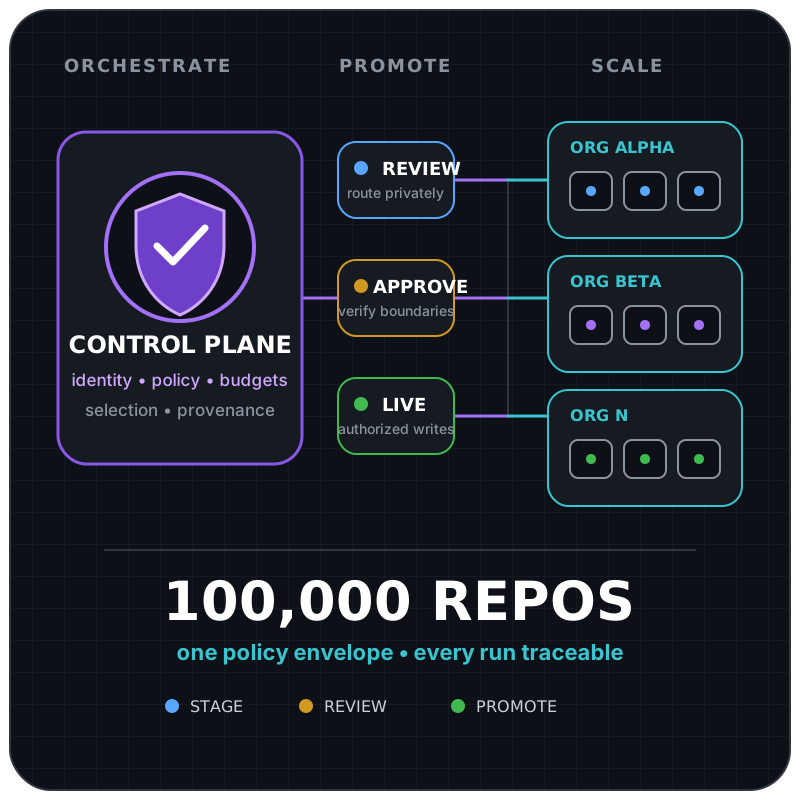
Roll out each campaign independently. Begin with one explicit target in review, inspect the proposal in the private review repository, and allow target writes only after that bounded scenario succeeds.
Promotion at a Glance
Section titled “Promotion at a Glance”- Run the installed campaign in
reviewagainst one target. - Verify the private review destination changed and the target did not.
- Run one low-risk target in
liveand verify the resulting output and downstream checks. - Enable the scheduled live campaign with
max_reposkept small. - Increase limits only from observed evidence.
Set the campaign’s checked-in enabled field to false whenever authentication, routing, output quality, cost, or provenance is uncertain. Resume in review after correcting the issue.
review --approve--> limited live --observe--> scheduled live ^ | | +-----------------------+-------------------------+ uncertainty: disable, then reviewCampaign-Level Control
Section titled “Campaign-Level Control”Each campaign under control-plane.campaigns has its own mode and limits. Review safe outputs route to the current control-plane repository unless a manual run supplies an allowed safe_output_repo. This is the primary unit of gradual rollout.
| Control | Campaign JSON field | Default |
|---|---|---|
| Kill switch | enabled | true for a declared campaign |
| Output mode | mode | review |
| Scheduled absolute cap | max-repositories | 1 |
| Rollout percentage | rollout-percent | 100 |
| Exact target mode | targets.<owner/repository>.mode | Campaign mode |
| Worker workflow identity | workers.<worker>.workflow | Required workflow slug |
| Worker kill switch | workers.<worker>.enabled | true |
| Optional worker mode ceiling | workers.<worker>.max-mode | Inherit campaign or exact-target mode |
Changing one campaign does not change another. For example, Dependabot may be live while Optimization remains in review.
An exact campaign target can advance independently while the campaign remains in review elsewhere:
{ "dependabot": { "mode": "review", "targets": { "acme/example-service": { "mode": "live" } } }}Unmatched repositories retain the campaign mode. Exact targets must remain inside control-plane.scope, comparisons are case-insensitive, and duplicate spellings fail validation. The worker re-resolves its own target policy before execution, so a dispatched envelope cannot promote a review target. A manual mode may narrow all selected targets to review but cannot widen any target to live.
Absolute caps default to 1, so missing configuration cannot create broad fan-out. Rollout percentages accept integers from 1 through 100 and default to 100. The control plane rounds the percentage-derived repository count up for a non-empty candidate set, then applies the smallest of that count, max_repos, and the target count supported by the declared dispatch budget and eligible worker count. For example, a 10 percent rollout over 25 discovered repositories permits at most 3 selections before stricter caps are applied. Invalid values fail closed.
Automatic discovery scans at most control-plane.inventory.max-scan-repositories, defaulting to 1000 with a hard maximum of 100000. The checked-in cell and batch fields deterministically select one bounded inventory slice before ranking. They do not auto-advance or retry batches. Manual target and review repositories must satisfy control-plane.scope, whose allowed owners default to the control repository owner.
Live Authority Check
Section titled “Live Authority Check”The control repository’s .github/workflows/cao.json is the sole live-activation decision marker. Before promoting a campaign to live, operators must declare the campaign mode, worker ceiling, allowed owner or exact repository, and any target-specific mode in that policy. Workers resolve it at the exact workflow SHA, so a target repository cannot widen, narrow, or veto the decision by adding, changing, or removing its own files.
If an enterprise and organization runtime both select the same target and campaign, keep both in review until operators choose one control repository and remove live scope from the other. Do not rely on run timing or workflow concurrency to resolve the conflict. Separate control repositories have independent queues and kill switches.
| Mode | Target behavior | Intended use |
|---|---|---|
review | safe outputs route to the current control-plane repository, with an optional manual safe_output_repo override | Human review of proposed effects before target mutation |
live | Declared worker workflow safe outputs may write to the selected target | Production campaign after promotion gates pass |
Review mode is the installation default. It resolves its destination from the manual safe_output_repo workflow input, then github.repository.
In review mode, the review repository is not treated as a clone of the target. When a target-bound mutation cannot be represented natively against the review repository, the worker should publish an artifact-backed review bundle describing the target, intended output primitive, base branch, and supporting evidence.
Pages Report Routing
Section titled “Pages Report Routing”Pages report routing follows the control-plane modes. Deployment is still conventional deterministic GitHub Actions automation, but the effective mode selects an access-controlled review site update or a production site update.
| Mode | Report source behavior |
|---|---|
review | Proposed report source data is routed to the private safe_output_repo and published to its access-controlled review Pages site. Production Pages is unchanged. |
live | Declared report source data is written to its normal durable destination and published to the production Pages site. |
The review and production publishers use fixed trusted source locations and build code and accept no agent-generated build commands, paths, repository names, or site bundles through dispatch inputs. They should use separate build and deploy jobs. The build job needs contents: read and its own pages: write permission for actions/configure-pages; the deploy job independently needs pages: write plus id-token: write and deploys through a protected environment. Agents do not receive those permissions or authority to change the routed mode.
For Pages reports, safe_output_repo retains its standard meaning as the safe-output review destination and also owns the review Pages deployment. It must be private, Pages-enabled, and access-controlled for the intended reviewers. Review and production use distinct repositories or protected environments, URLs, and concurrency groups. If access-controlled review Pages is unavailable, review publication fails closed rather than publishing publicly or falling back to a different output channel.
workflow_dispatch Runs
Section titled “workflow_dispatch Runs”A workflow_dispatch run can set the target_repo, max_repos, rollout_percent, safe_output_mode, and safe_output_repo workflow inputs. These DispatchOps runs are useful for a controlled canary or incident diagnosis. They do not update checked-in policy. Mode and numeric requests may narrow the resolved campaign policy but cannot widen it.
workflow_dispatch runs should narrow scope during validation:
- specify one
target_repo; - keep
max_reposat1; - use
reviewfirst; - use the control-plane repository for scheduled review runs, and use
safe_output_repoonly when a manual run needs a private override; - do not use a manual live run to bypass failed promotion gates.
Example canary inputs:
target_repo: acme/example-servicemax_repos: 1rollout_percent: 100safe_output_mode: reviewsafe_output_repo: ""Promotion Plan
Section titled “Promotion Plan”Promote each campaign independently:
- Installed in review: credentials and repository access are configured; proposals route to the private review destination without target writes.
- Review verified: run against one representative repository; inspect selection, prompts, permissions, correlation data, and the actionable proposal. For a Pages report, also verify that the access-controlled review site updates and production Pages does not.
- Enrolled: record target-owner approval and commit the assigned control repository to the target’s protected
.github/workflows/cao.json. - Limited live: confirm no other control repository has live authority for the same campaign, then manually target one low-risk repository and verify the resulting safe output and downstream CI. For a Pages report, verify the production site update independently of the review site.
- Scheduled live: enable the scheduled campaign with
max_reposkept small, then increase limits only from observed evidence.
Promotion evidence should cover successful authentication, correct target selection, safe output routing, no unexpected writes, worker workflow completion, useful safe output quality, and acceptable AI Credit consumption.
Rollback
Section titled “Rollback”The first rollback action is to set the affected campaign’s enabled field to false in .github/workflows/cao.json and deploy that reviewed revision. For a narrower incident, set the worker’s enabled field to false. Then:
- stop new dispatches;
- inspect the orchestrator run and correlated worker runs;
- close, revert, or supersede unintended safe outputs using normal repository procedures;
- if a workflow or campaign release caused the incident, restore its last known-good Git revision, compile every affected workflow, and deploy that revision through the normal reviewed change process;
- otherwise, correct the affected policy or worker behavior and compile every affected workflow;
- re-enable the campaign in review mode and repeat promotion gates.
Do not reduce another campaign’s mode unless the incident involves shared authentication or shared control behavior.
If two runtimes were found mutating the same (target repository, campaign) pair, disable that campaign in every conflicting control repository, cancel active runs, and assign one live authority before resuming in review. Stopping only one runtime is insufficient until its queued and in-progress runs are also canceled.